
Database Connectors
Faucet supports seven SQL databases: PostgreSQL, MySQL, MariaDB, SQL Server, Oracle, Snowflake and SQLite. Each database is connected as a service, a named reference to a single database that becomes an API namespace at /api/v1/<name>.
Three ways to connect
Admin UI (easiest). Open Databases → Add database, pick the engine, and fill in host, port, database, username and password, the same details you'd give any database client. Click Test connection to check them before saving: Faucet connects, counts your tables, and shows a plain-language hint if something is wrong. You never write a connection string, and special characters in passwords need no escaping. See Admin UI for a walkthrough with screenshots.
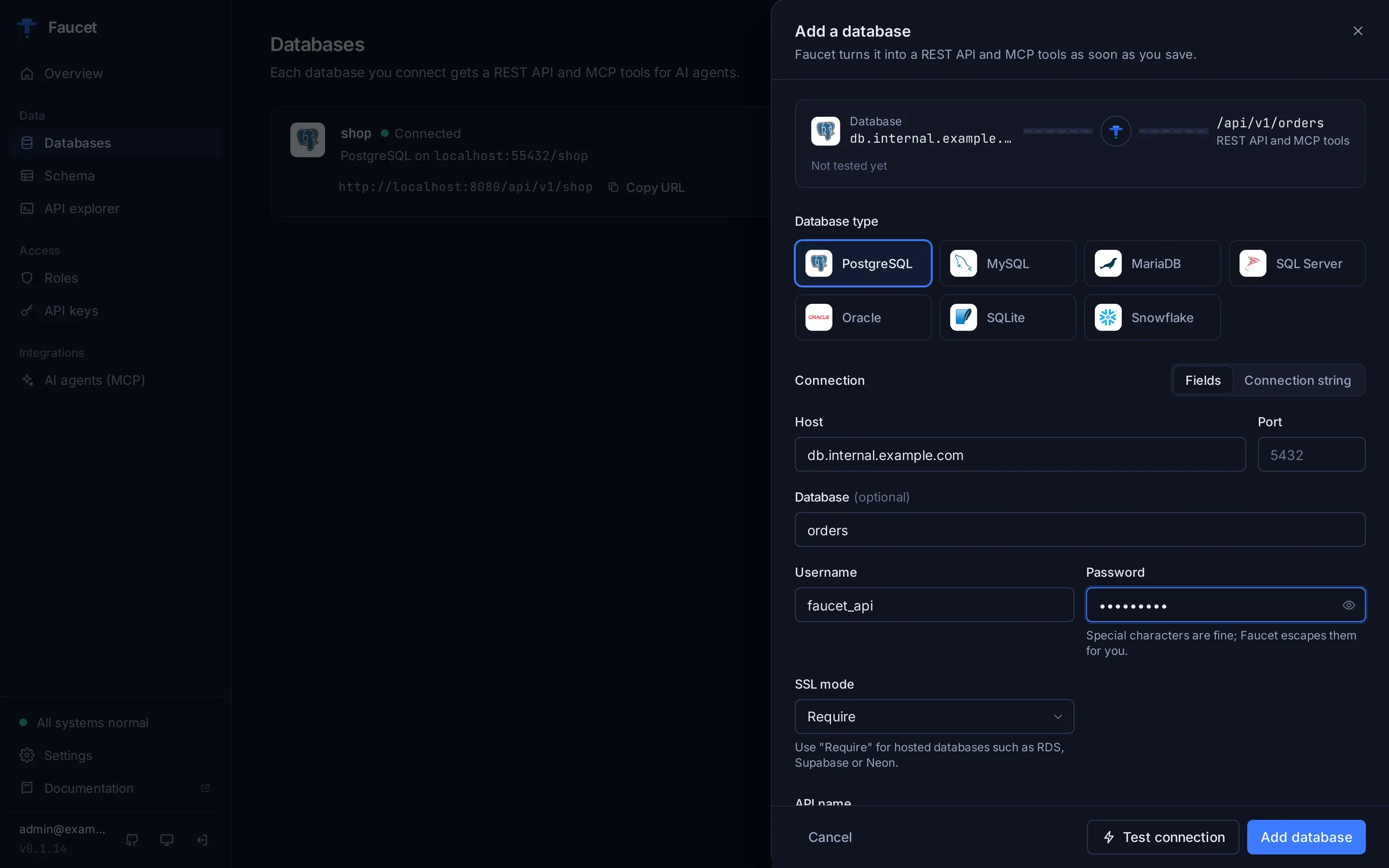
CLI fields. faucet db add accepts the same details as flags and builds the connection string for you:
faucet db add --name mydb --driver postgres \
  --host db.example.com --user api --password 's3cret@!' --database mydb --ssl-mode require
Connection string (DSN). If you already have a DSN, paste it into the UI's Connection string tab, pass --dsn, or send dsn to the API. Each section below documents the DSN format and its useful parameters.
| Database | Driver name | UI fields |
|---|---|---|
| PostgreSQL | postgres | Host, port (5432), database, username, password, SSL mode |
| MySQL | mysql | Host, port (3306), database, username, password, TLS |
| MariaDB | mysql | Same as MySQL |
| SQL Server | mssql | Host, port (1433), database, username, password, encryption, trust server certificate |
| Oracle | oracle | Host, port (1521), service name, username, password, TLS |
| Snowflake | snowflake | Account identifier, username, password or key-pair file, database, schema, warehouse, role |
| SQLite | sqlite | File path on the Faucet server |
Supported versions
| Database | Versions | Hosted options | Driver |
|---|---|---|---|
| PostgreSQL | 9.6 – 17 | Amazon RDS, Aurora, Supabase, Neon, Azure Database | postgres |
| MySQL | 5.7 – 9.x | Amazon RDS, Aurora MySQL, PlanetScale, Azure MySQL | mysql |
| MariaDB | 10.2 – 11.x | SkySQL, Amazon RDS for MariaDB | mysql |
| SQL Server | 2012 – 2022 | Azure SQL Database, Amazon RDS | mssql |
| Oracle | 12c – 26ai | Oracle Cloud (OCI), Amazon RDS, Azure | oracle |
| Snowflake | Current | AWS, Azure, GCP | snowflake |
| SQLite | 3.35+ | Local file, in-memory | sqlite |
All connectors implement the same Connector interface, which provides:
- Connection management (connect, disconnect, ping)
- Schema introspection (tables, columns, views, stored procedures)
- Query building (SELECT, INSERT, UPDATE, DELETE with dialect-specific SQL)
- Schema modification (CREATE TABLE, ALTER TABLE, DROP TABLE)
- Stored procedure execution
PostgreSQL
Driver name: postgres
DSN Format
postgres://username:password@host:port/database?sslmode=disableOr the keyword/value format:
host=localhost port=5432 user=myuser password=mypass dbname=mydb sslmode=disableCommon DSN Parameters
| Parameter | Default | Description |
|---|---|---|
sslmode | require | SSL mode: disable, require, verify-ca, verify-full |
search_path | public | Default schema |
connect_timeout | -- | Connection timeout in seconds |
application_name | -- | Application name for pg_stat_activity |
Passwords with special characters: the admin UI fields and the CLI --password flag need no escaping. In a DSN, URL-encode special characters (a password of Pa@ss#1 becomes Pa%40ss%231). Faucet also repairs raw @, #, : and / in the password, and leaves already-encoded values alone, but a raw ? always has to be encoded as %3F.
DSN Examples
# Local development
postgres://localhost/mydb?sslmode=disable

# Remote with SSL
postgres://user:pass@db.example.com:5432/production?sslmode=require

# With search path
postgres://user:pass@localhost/mydb?sslmode=disable&search_path=myschema

# Amazon RDS
postgres://admin:secret@mydb.abc123.us-east-1.rds.amazonaws.com:5432/mydb?sslmode=require
Supported Features
| Feature | Supported |
|---|---|
| Schema introspection | Yes |
| RETURNING clause | Yes |
| Upsert (ON CONFLICT) | Yes |
| Stored procedures | Yes |
| Views | Yes |
| Parameter style | $1, $2, $3 |
| Default schema | public |
Adding via CLI
faucet db add \
  --name mypostgres \
  --driver postgres \
  --dsn "postgres://user:pass@localhost:5432/mydb?sslmode=disable"
MySQL
Driver name: mysql
DSN Format
username:password@tcp(host:port)/database?parseTime=trueCommon DSN Parameters
| Parameter | Default | Description |
|---|---|---|
parseTime | false | Parse DATE/DATETIME to time.Time (recommended: true) |
charset | utf8mb4 | Character set |
collation | utf8mb4_general_ci | Collation |
tls | false | TLS mode: true, false, skip-verify, or custom name |
timeout | -- | Connection timeout (e.g., 5s) |
readTimeout | -- | I/O read timeout |
writeTimeout | -- | I/O write timeout |
multiStatements | false | Allow multiple statements in one query |
DSN Examples
# Local development
root:password@tcp(localhost:3306)/mydb?parseTime=true

# Remote with TLS
user:pass@tcp(db.example.com:3306)/production?parseTime=true&tls=true

# With charset
user:pass@tcp(localhost:3306)/mydb?parseTime=true&charset=utf8mb4

# Amazon RDS
admin:secret@tcp(mydb.abc123.us-east-1.rds.amazonaws.com:3306)/mydb?parseTime=true&tls=true
Supported Features
| Feature | Supported |
|---|---|
| Schema introspection | Yes |
| RETURNING clause | No |
| Upsert (ON DUPLICATE KEY) | Yes |
| Stored procedures | Yes |
| Views | Yes |
| Parameter style | ? |
| Default schema | database name |
Note: Without RETURNING support, INSERT operations return the submitted records rather than the server-generated values. Use a subsequent GET to retrieve auto-incremented IDs.
Adding via CLI
faucet db add \
  --name mymysql \
  --driver mysql \
  --dsn "user:pass@tcp(localhost:3306)/mydb?parseTime=true"
MariaDB
Driver name: mysql
MariaDB speaks the MySQL protocol, so Faucet connects to it with the MySQL driver. Everything in the MySQL section applies: the DSN format, the parameters, and the features. In the admin UI, MariaDB has its own tile with the same fields as MySQL. Once saved, the database is listed with the mysql driver.
Tested with MariaDB 10.2 through 11.x, including SkySQL and Amazon RDS for MariaDB.
faucet db add --name shop --driver mysql \
  --host mariadb.internal --user app --password secret --database shop
As with MySQL, Faucet does not use RETURNING, so inserts return the submitted records; read auto-incremented IDs back with a follow-up GET.
SQL Server
Driver name: mssql
DSN Format
sqlserver://username:password@host:port?database=dbnameOr using ADO-style connection string:
server=host;port=1433;user id=username;password=password;database=dbnameCommon DSN Parameters
| Parameter | Default | Description |
|---|---|---|
database | -- | Database name |
encrypt | false | Enable encryption: true, false, disable |
TrustServerCertificate | false | Trust self-signed certificates |
app name | -- | Application name |
connection timeout | 0 | Connection timeout in seconds |
Passwords with special characters: the admin UI fields and the CLI --password flag need no escaping. In a DSN, URL-encode special characters (a password of Pa@ss#1 becomes Pa%40ss%231). Faucet also repairs raw @, #, : and / in the password, and leaves already-encoded values alone, but a raw ? always has to be encoded as %3F.
DSN Examples
# Local development
sqlserver://sa:YourStrong!Passw0rd@localhost:1433?database=mydb

# Remote with encryption
sqlserver://user:pass@db.example.com:1433?database=production&encrypt=true

# Trust self-signed cert (development only)
sqlserver://sa:password@localhost:1433?database=mydb&encrypt=true&TrustServerCertificate=true

# Azure SQL
sqlserver://admin:secret@myserver.database.windows.net:1433?database=mydb&encrypt=true
Supported Features
| Feature | Supported |
|---|---|
| Schema introspection | Yes |
| RETURNING clause | Via OUTPUT clause |
| Upsert (MERGE) | Yes |
| Stored procedures | Yes |
| Views | Yes |
| Parameter style | @p1, @p2, @p3 |
| Default schema | dbo |
Adding via CLI
faucet db add \
  --name mymssql \
  --driver mssql \
  --dsn "sqlserver://sa:YourStrong!Passw0rd@localhost:1433?database=mydb"
Snowflake
Driver name: snowflake
DSN Format
account_identifier/database/schema?user=username&password=password&warehouse=whOr using the Snowflake Go driver format:
username:password@account_identifier/database/schema?warehouse=wh&role=roleCommon DSN Parameters
| Parameter | Default | Description |
|---|---|---|
warehouse | -- | Snowflake warehouse |
role | -- | Snowflake role |
schema | PUBLIC | Default schema |
authenticator | -- | Auth type: snowflake (default), externalbrowser, oauth, SNOWFLAKE_JWT |
token | -- | OAuth access token (when authenticator=oauth) |
loginTimeout | 60 | Login timeout in seconds |
DSN Examples
# Basic connection (username/password)
user:pass@myaccount/mydb/public?warehouse=COMPUTE_WH

# With role
user:pass@myaccount/mydb/public?warehouse=COMPUTE_WH&role=ANALYST

# Full URL format
user:pass@myorg-myaccount/mydb/PUBLIC?warehouse=COMPUTE_WH&role=DATA_READER
Key Pair (JWT) Authentication
For environments where username/password is not permitted, Faucet supports Snowflake key pair authentication using RSA private keys.
1. Generate an RSA key pair:
# Generate PKCS#8 private key (recommended)
openssl genpkey -algorithm RSA -pkeyopt rsa_keygen_bits:2048 -out snowflake_key.p8

# Extract the public key
openssl pkey -in snowflake_key.p8 -pubout -out snowflake_key.pub
2. Register the public key in Snowflake:
ALTER USER MY_USER SET RSA_PUBLIC_KEY='MIIBIjANBg...';(Paste the key contents without the -----BEGIN/END PUBLIC KEY----- headers.)
3. Configure the service with private_key_path:
# Via CLI — no password needed in the DSN
faucet db add \
  --name analytics \
  --driver snowflake \
  --dsn "MY_USER@myorg-myaccount/ANALYTICS/PUBLIC?warehouse=COMPUTE_WH" \
  --private-key-path /path/to/snowflake_key.p8
Via API:
{
  "name": "analytics",
  "driver": "snowflake",
  "dsn": "MY_USER@myorg-myaccount/ANALYTICS/PUBLIC?warehouse=COMPUTE_WH",
  "private_key_path": "/path/to/snowflake_key.p8"
}
Via YAML config:
services:
  - name: analytics
    driver: snowflake
    dsn: "MY_USER@myorg-myaccount/ANALYTICS/PUBLIC?warehouse=COMPUTE_WH"
    private_key_path: /path/to/snowflake_key.p8
Supported PEM formats: PKCS#8 (PRIVATE KEY) and PKCS#1 (RSA PRIVATE KEY).
Supported Features
| Feature | Supported |
|---|---|
| Schema introspection | Yes |
| RETURNING clause | No |
| Upsert | No |
| Stored procedures | Yes |
| Views | Yes |
| Key pair (JWT) auth | Yes |
| Parameter style | ? |
| Default schema | PUBLIC |
Adding via CLI
# Username/password
faucet db add \
  --name mysnowflake \
  --driver snowflake \
  --dsn "user:pass@myaccount/mydb/public?warehouse=COMPUTE_WH"

# Key pair authentication
faucet db add \
  --name mysnowflake \
  --driver snowflake \
  --dsn "user@myaccount/mydb/public?warehouse=COMPUTE_WH" \
  --private-key-path /path/to/key.p8
Oracle
Driver name: oracle
Faucet connects to Oracle Database (12c through 26ai) using the pure-Go go-ora driver. No Oracle Instant Client or OCI libraries are required.
DSN Format
oracle://username:password@host:port/service_nameCommon DSN Parameters
| Parameter | Default | Description |
|---|---|---|
ssl | false | Enable SSL/TLS: true, false |
ssl verify | true | Verify server certificate |
connect timeout | 15 | Connection timeout in seconds |
TRACE FILE | -- | Path to trace file for debugging |
Passwords with special characters: the admin UI fields and the CLI --password flag need no escaping. In a DSN, URL-encode special characters (a password of Pa@ss#1 becomes Pa%40ss%231). Faucet also repairs raw @, #, : and / in the password, and leaves already-encoded values alone, but a raw ? always has to be encoded as %3F.
DSN Examples
# Local development
oracle://system:password@localhost:1521/XEPDB1

# Remote with service name
oracle://appuser:secret@db.example.com:1521/PROD

# Oracle Cloud (OCI)
oracle://admin:MyP%40ssword@adb.us-ashburn-1.oraclecloud.com:1522/mydb_tp?ssl=true

# Amazon RDS for Oracle
oracle://admin:secret@mydb.abc123.us-east-1.rds.amazonaws.com:1521/ORCL

# With connect timeout
oracle://user:pass@db.example.com:1521/PROD?connect timeout=30
Supported Features
| Feature | Supported |
|---|---|
| Schema introspection | Yes |
| RETURNING clause | No |
| Upsert (MERGE) | No |
| Stored procedures | Yes |
| Views | Yes |
| Parameter style | :1, :2, :3 |
| Default schema | Current user |
| Pagination | OFFSET/FETCH (12c+) |
Note: Oracle uses OFFSET n ROWS FETCH NEXT m ROWS ONLY for pagination (requires Oracle 12c or later; tested through 26ai). Without RETURNING support in the standard query path, INSERT operations return the submitted records rather than server-generated values.
Schema (Owner)
In Oracle, the schema is equivalent to the database user (owner). By default, Faucet uses the connected user's schema. Override with --schema:
faucet db add \
  --name myoracle \
  --driver oracle \
  --dsn "oracle://appuser:pass@localhost:1521/XEPDB1" \
  --schema HR
Adding via CLI
faucet db add \
  --name myoracle \
  --driver oracle \
  --dsn "oracle://user:pass@localhost:1521/XEPDB1"
SQLite
Driver name: sqlite
DSN Format
/path/to/database.db?param=valueOr for an in-memory database:
:memory:Common DSN Parameters
| Parameter | Default | Description |
|---|---|---|
_journal_mode | delete | Set to WAL for better concurrent read performance |
_busy_timeout | 5000 | Milliseconds to wait when the database is locked |
_foreign_keys | on | Enable foreign key enforcement |
_cache_size | -2000 | Page cache size (negative = KB, positive = pages) |
DSN Examples
# Local file
/var/lib/faucet/mydata.db

# With WAL mode (recommended)
/var/lib/faucet/mydata.db?_journal_mode=WAL

# With WAL and busy timeout
/var/lib/faucet/mydata.db?_journal_mode=WAL&_busy_timeout=10000

# In-memory (ephemeral, for testing)
:memory:
Supported Features
| Feature | Supported |
|---|---|
| Schema introspection | Yes |
| RETURNING clause | Yes (SQLite 3.35+) |
| Upsert (ON CONFLICT) | Yes |
| Stored procedures | No |
| Views | Yes |
| Parameter style | ? |
| Default schema | main |
Note: SQLite does not support stored procedures. The _proc endpoint returns an error for SQLite services.
Adding via CLI
faucet db add \
  --name mydata \
  --driver sqlite \
  --dsn "/path/to/mydata.db?_journal_mode=WAL"
Connection Pool Configuration
Each service has its own connection pool. Configure it when creating the service via the API:
{
  "name": "mydb",
  "driver": "postgres",
  "dsn": "postgres://...",
  "pool": {
    "max_open_conns": 100,
    "max_idle_conns": 25,
    "conn_max_lifetime": "5m",
    "conn_max_idle_time": "1m"
  }
}
Pool Settings
| Setting | Default | Description |
|---|---|---|
max_open_conns | 100 | Maximum number of open connections to the database |
max_idle_conns | 25 | Maximum number of idle connections in the pool |
conn_max_lifetime | 5 minutes | Maximum time a connection can be reused |
conn_max_idle_time | 1 minute | Maximum time a connection can sit idle |
Tuning Guidelines
- Small/dev:
max_open_conns=10, max_idle_conns=2 - Medium production:
max_open_conns=100, max_idle_conns=25(defaults) - High traffic:
max_open_conns=200-500, max_idle_conns=50-100 - Serverless databases (Snowflake, Aurora Serverless): Lower
max_open_connsto respect provider limits - SQLite:
max_open_conns=1, max_idle_conns=1(SQLite supports only one writer at a time)
Keep conn_max_lifetime shorter than the database server's connection timeout to avoid stale connections.
Schema Exposure
By default, Faucet exposes the database's default schema:
| Database | Default Schema |
|---|---|
| PostgreSQL | public |
| MySQL | (the database itself) |
| SQL Server | dbo |
| Oracle | (connected user) |
| Snowflake | PUBLIC |
| SQLite | main |
Override with the --schema flag when adding a service or the schema field in the API:
faucet db add \
  --name mydb \
  --driver postgres \
  --dsn "postgres://..." \
  --schema custom_schema
Read-Only and Raw SQL Modes
Each service supports two security flags:
| Flag | Default | Description |
|---|---|---|
read_only | false | Only allow GET requests (no INSERT, UPDATE, DELETE, DDL) |
raw_sql_allowed | false | Allow raw SQL execution via the MCP faucet_raw_sql tool |
Set via the system API:
curl -X PUT http://localhost:8080/api/v1/system/service/mydb \
  -H "Authorization: Bearer $TOKEN" \
  -H "Content-Type: application/json" \
  -d '{"is_active": true, "read_only": true, "raw_sql_allowed": false}'
Testing a Connection
In the admin UI, Test connection in the add/edit drawer checks unsaved settings, and Test on a database row checks a saved one.
To check settings over the API without saving them, use POST /api/v1/system/connection/test.
Use the CLI to verify connectivity:
faucet db test mydbOr via the API -- a successful GET to /_table confirms the connection is working:
curl http://localhost:8080/api/v1/mydb/_table \
  -H "Authorization: Bearer $TOKEN"