
MCP Server for SQL Databases
Faucet includes a built-in Model Context Protocol (MCP) server that allows AI agents like Claude to directly query and modify your databases through structured tool calls.
What is MCP?
The Model Context Protocol is an open standard for connecting AI assistants to external data sources and tools. Instead of generating SQL from natural language (with risk of errors and injection), MCP provides structured, type-safe tools that the AI can call with validated parameters.
Faucet's MCP server exposes:
- Tools -- callable functions for querying, inserting, updating, and deleting data
- Resources -- read-only data that AI clients can load into context (service lists, schemas)
Connect an AI agent
The quickest way is the AI agents (MCP) page in the admin UI. Paste an API key, and it gives you a ready-made config for each client.
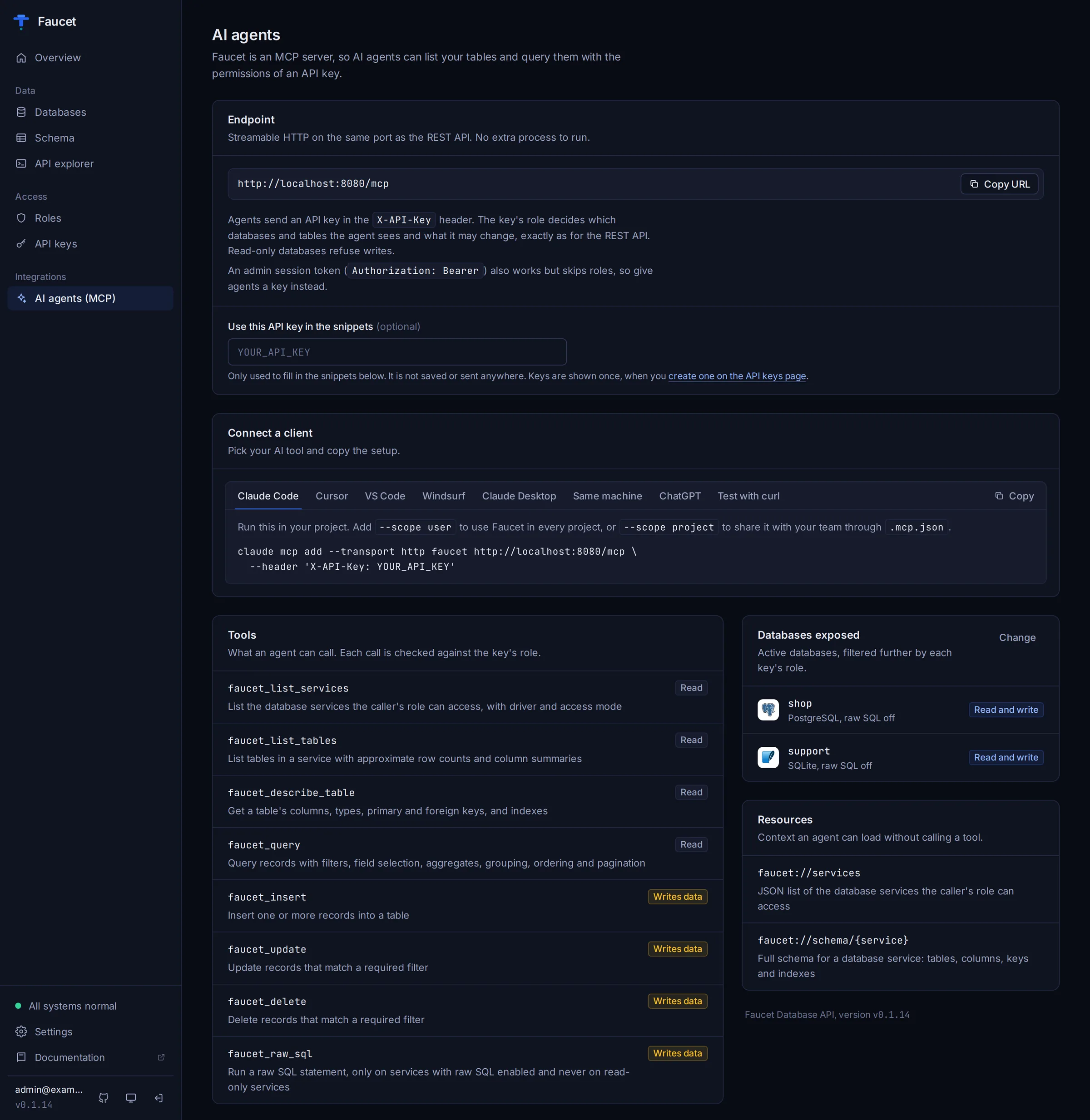
Built-in HTTP endpoint (recommended)
faucet serve includes an MCP server at /mcp, on the same port as the REST API, using the Streamable HTTP transport. There's no extra process to run. Agents authenticate with an API key in the X-API-Key header, and the key's role decides which databases and tables they can see and change, exactly as for the REST API. An admin session token (Authorization: Bearer ...) also works but bypasses roles, so give agents a key.
Replace YOUR_API_KEY with a key from the API keys page or faucet key create.
Connect Claude Code
claude mcp add --transport http faucet http://localhost:8080/mcp \
  --header 'X-API-Key: YOUR_API_KEY'
Add --scope user to use Faucet in every project, or --scope project to share it with your team through .mcp.json.
Connect Cursor
Add this to ~/.cursor/mcp.json (all projects) or .cursor/mcp.json (one project):
{
  "mcpServers": {
    "faucet": {
      "url": "http://localhost:8080/mcp",
      "headers": { "X-API-Key": "YOUR_API_KEY" }
    }
  }
}
Connect VS Code (Copilot agent mode)
Add this to .vscode/mcp.json, then use the tools from Copilot Chat in agent mode:
{
  "servers": {
    "faucet": {
      "type": "http",
      "url": "http://localhost:8080/mcp",
      "headers": { "X-API-Key": "YOUR_API_KEY" }
    }
  }
}
Connect Windsurf
Add this to ~/.codeium/windsurf/mcp_config.json:
{
  "mcpServers": {
    "faucet": {
      "serverUrl": "http://localhost:8080/mcp",
      "headers": { "X-API-Key": "YOUR_API_KEY" }
    }
  }
}
Connect Claude Desktop (via mcp-remote)
Claude Desktop's config file only launches local commands, so use the mcp-remote bridge (needs Node.js). Open Settings → Developer → Edit config, or edit ~/Library/Application Support/Claude/claude_desktop_config.json (macOS) or %APPDATA%\Claude\claude_desktop_config.json (Windows):
{
  "mcpServers": {
    "faucet": {
      "command": "npx",
      "args": ["-y", "mcp-remote", "http://localhost:8080/mcp", "--header", "X-API-Key:YOUR_API_KEY"]
    }
  }
}
For a Faucet server on another machine over plain http://, add "--allow-http" to the args. Restart Claude Desktop after saving.
Use Faucet from ChatGPT
ChatGPT connectors sign in with OAuth, which Faucet does not offer yet. Two routes work today, and both need Faucet to be reachable from the internet. Connect Base44, Replit and ChatGPT shows how to expose it safely:
- Custom GPT: add an Action, import from
https://your-faucet.example.com/openapi.json, and set authentication to API key with the custom headerX-API-Key. - OpenAI Responses API: pass Faucet as an MCP tool:
{
  "type": "mcp",
  "server_label": "faucet",
  "server_url": "https://your-faucet.example.com/mcp",
  "headers": { "X-API-Key": "YOUR_API_KEY" },
  "require_approval": "never"
}
Test the endpoint with curl
A reply that contains serverInfo means the URL and key work:
curl -sS -X POST http://localhost:8080/mcp \
  -H 'Content-Type: application/json' \
  -H 'Accept: application/json, text/event-stream' \
  -H 'X-API-Key: YOUR_API_KEY' \
  -d '{"jsonrpc":"2.0","id":1,"method":"initialize","params":{"protocolVersion":"2025-06-18","capabilities":{},"clientInfo":{"name":"curl","version":"1.0"}}}'
Transport Modes
Streamable HTTP inside faucet serve (recommended)
This is the endpoint described above: http://<host>:<port>/mcp, authenticated with API keys.
stdio Mode
The MCP server communicates over stdin/stdout using JSON-RPC. The client launches faucet mcp as a subprocess, so the faucet binary must be installed where the agent runs. It reads the same config store as the server (~/.faucet by default, or --data-dir).
faucet mcpWARNING
stdio mode runs with full admin rights and does not apply roles. Use it only on your own machine; for anything shared, use the HTTP endpoint with an API key.
Standalone HTTP Mode
faucet mcp can also listen for Streamable HTTP on its own port, separate from faucet serve:
faucet mcp --transport http --port 3001Available Tools
Discovery Tools
These are read-only tools for exploring available databases and schemas.
faucet_list_services
List all database services configured in Faucet.
Parameters: None
Returns: Array of services with name, driver, active status, read-only flag, and raw SQL permission.
[
  {
    "name": "mydb",
    "label": "My Database",
    "driver": "postgres",
    "is_active": true,
    "read_only": false,
    "raw_sql_allowed": true
  }
]
faucet_list_tables
List all tables in a database service with column summaries and approximate row counts.
Parameters:
| Name | Required | Description |
|---|---|---|
service | Yes | Name of the database service |
Returns: Array of tables/views with column names, types, primary key indicators, and row counts.
[
  {
    "name": "users",
    "type": "table",
    "row_count": 15000,
    "columns": [
      {"name": "id", "type": "integer", "pk": true},
      {"name": "name", "type": "varchar(255)"},
      {"name": "email", "type": "varchar(255)"}
    ]
  },
  {
    "name": "active_users",
    "type": "view",
    "columns": [
      {"name": "id", "type": "integer"},
      {"name": "name", "type": "varchar(255)"}
    ]
  }
]
faucet_describe_table
Get detailed schema for a specific table, including all columns, types, nullability, defaults, primary keys, foreign keys, and indexes.
Parameters:
| Name | Required | Description |
|---|---|---|
service | Yes | Name of the database service |
table | Yes | Name of the table to describe |
Returns: Full table schema object. If the table is not found, the error message includes a list of available tables to help the AI self-correct.
Query Tool
faucet_query
Query records from a database table with optional filtering, field selection, ordering, and pagination. Results are returned as JSON.
Parameters:
| Name | Required | Description |
|---|---|---|
service | Yes | Name of the database service |
table | Yes | Name of the table to query |
filter | No | Filter expression (see Filter Syntax) |
fields | No | Array of column names to return (omit for all) |
order | No | Order clause (e.g., "created_at DESC, name ASC") |
limit | No | Max records (default 25, max 1000) |
offset | No | Records to skip for pagination |
Returns:
{
  "records": [
    {"id": 1, "name": "Alice", "email": "alice@example.com"}
  ],
  "count": 1,
  "limit": 25,
  "offset": 0
}
Mutation Tools
These tools modify data. They check the service's read_only flag and refuse operations on read-only services.
faucet_insert
Insert one or more records into a table.
Parameters:
| Name | Required | Description |
|---|---|---|
service | Yes | Name of the database service |
table | Yes | Name of the table |
records | Yes | Array of record objects to insert |
Example call:
{
  "service": "mydb",
  "table": "users",
  "records": [
    {"name": "Alice", "email": "alice@example.com", "age": 30}
  ]
}
Returns: Inserted records (with auto-generated fields like IDs on databases that support RETURNING) and count.
faucet_update
Update records matching a filter expression.
Parameters:
| Name | Required | Description |
|---|---|---|
service | Yes | Name of the database service |
table | Yes | Name of the table |
filter | Yes | Filter to select records (required to prevent full-table updates) |
record | Yes | Object with column names and new values |
Example call:
{
  "service": "mydb",
  "table": "users",
  "filter": "id = 42",
  "record": {"status": "archived"}
}
faucet_delete
Delete records matching a filter expression.
Parameters:
| Name | Required | Description |
|---|---|---|
service | Yes | Name of the database service |
table | Yes | Name of the table |
filter | Yes | Filter to select records (required to prevent full-table deletes) |
Returns: Count of deleted records.
Raw SQL Tool
faucet_raw_sql
Execute a raw SQL query against a service. Only available for services with raw_sql_allowed enabled.
Parameters:
| Name | Required | Description |
|---|---|---|
service | Yes | Name of the database service |
sql | Yes | SQL query to execute |
params | No | Positional parameters for the query |
timeout | No | Query timeout in seconds (default 30, max 300) |
limit | No | Max rows to return (default 100, max 10000) |
Example call:
{
  "service": "mydb",
  "sql": "SELECT u.name, COUNT(o.id) as order_count FROM users u LEFT JOIN orders o ON o.user_id = u.id GROUP BY u.name ORDER BY order_count DESC LIMIT 10",
  "timeout": 30
}
Returns:
{
  "records": [...],
  "count": 10,
  "truncated": false
}
If results exceed the limit, truncated is true and a helpful message is included.
Available Resources
MCP resources provide read-only data that AI clients can load into their context.
faucet://services
List of all connected database services with their driver type, active status, and permissions.
URI: faucet://servicesMIME type: application/json
faucet://schema/
Full schema introspection for a database service, including tables, columns, primary keys, foreign keys, and indexes.
URI template: faucet://schema/{service}MIME type: application/json
Example: faucet://schema/mydb returns the complete schema for the mydb service.
Claude Desktop Configuration (stdio)
To have Claude Desktop launch a local faucet mcp process instead of using the HTTP endpoint, add this to claude_desktop_config.json:
{
  "mcpServers": {
    "faucet": {
      "command": "faucet",
      "args": ["mcp"],
      "env": {}
    }
  }
}
If Faucet is not in your PATH, use the full path:
{
  "mcpServers": {
    "faucet": {
      "command": "/usr/local/bin/faucet",
      "args": ["mcp"],
      "env": {}
    }
  }
}
With a Custom Data Directory
{
  "mcpServers": {
    "faucet": {
      "command": "faucet",
      "args": ["mcp", "--data-dir", "/path/to/faucet/data"],
      "env": {}
    }
  }
}
Claude Code Configuration (stdio)
To launch a local faucet mcp process, run claude mcp add faucet -- faucet mcp, or add this to your .mcp.json:
{
  "mcpServers": {
    "faucet": {
      "command": "faucet",
      "args": ["mcp"]
    }
  }
}
HTTP Mode for Remote Access
For remote agents, use the endpoint built into faucet serve (see Built-in HTTP endpoint). It shares the server's port and API keys. Faucet serves plain HTTP, so put TLS on a reverse proxy in front of it (see Deployment → Reverse Proxy).
If you run the standalone faucet mcp --transport http --port 3001 instead, it applies the same authentication, so clients still send X-API-Key:
{
  "mcpServers": {
    "faucet": {
      "url": "http://your-server:3001",
      "headers": { "X-API-Key": "YOUR_API_KEY" }
    }
  }
}
Usage Examples
Example 1: Data Exploration
A typical AI agent interaction flow:
- Agent calls
faucet_list_servicesto discover databases - Agent calls
faucet_list_tableson the relevant service to see available data - Agent calls
faucet_describe_tableto understand the schema of tables of interest - Agent calls
faucet_querywith appropriate filters to answer the user's question
Example 2: Natural Language to Database Query
User: "How many active users signed up last month?"
The AI agent would:
1. faucet_list_services -> ["mydb"]
2. faucet_describe_table(service="mydb", table="users")
   -> columns: id, name, email, status, created_at, ...
3. faucet_query(
     service="mydb",
     table="users",
     filter="status = 'active' AND created_at BETWEEN '2025-01-01' AND '2025-01-31'",
     fields=["id"],
     limit=1
   )
   -> {"records": [...], "count": 42}
Example 3: Data Modification
User: "Mark all orders from before 2024 as archived"
1. faucet_query(
     service="mydb",
     table="orders",
     filter="created_at < '2024-01-01' AND status != 'archived'",
     fields=["id"],
     limit=1
   )
   -> Shows matching count to confirm scope

2. faucet_update(
     service="mydb",
     table="orders",
     filter="created_at < '2024-01-01' AND status != 'archived'",
     record={"status": "archived"}
   )
   -> {"updated": [...], "count": 156}
Example 4: Cross-Table Analysis with Raw SQL
User: "What are the top 10 customers by total order value?"
faucet_raw_sql(
  service="mydb",
  sql="SELECT c.name, SUM(o.total) as total_value FROM customers c JOIN orders o ON o.customer_id = c.id GROUP BY c.id, c.name ORDER BY total_value DESC LIMIT 10"
)
Error Handling
MCP tools return helpful error messages that include context for the AI to self-correct:
- Service not found: Includes list of available services
- Table not found: Includes list of available tables
- Invalid filter: Includes filter syntax reference
- Invalid fields: Includes list of available columns
- Read-only violation: Suggests using structured query tools
- Raw SQL disabled: Suggests alternatives
This design allows AI agents to recover from errors without user intervention.
Tool Annotations
Each MCP tool is annotated with read/write metadata:
- Read-only tools (
faucet_list_services,faucet_list_tables,faucet_describe_table,faucet_query): Marked withreadOnlyHint: true - Mutating tools (
faucet_insert,faucet_update,faucet_delete,faucet_raw_sql): Marked withreadOnlyHint: false.faucet_raw_sqlcounts as mutating because the SQL it runs can change data.
MCP clients can use these annotations to require user confirmation before executing mutating operations.