
Role-Based Access Control (RBAC)
Faucet provides fine-grained access control through roles, API keys, and per-table access rules. Access rules can also store row-level filters, but Faucet does not apply them to queries yet (see Row-level filters).
Architecture Overview
API Key ---> Role ---> Access Rules ---> Service/Table/Verb permissions
\--> Row-level filters (stored only, not enforced yet)- API Keys authenticate requests and are bound to a single Role
- Roles group access rules that define what operations are allowed
- Access Rules control which HTTP verbs are permitted on which service components
- Filters (optional) are saved with a rule and returned by the API, but are not yet applied to queries
Admin users authenticated via JWT bypass RBAC and have full access to all endpoints.
Verb Bitmask
Access rules use a bitmask to specify which HTTP methods are allowed. Each HTTP method maps to a power of 2:
| HTTP Method | Verb Constant | Value | Description |
|---|---|---|---|
| GET | VerbGet | 1 | Read records |
| POST | VerbPost | 2 | Create records |
| PUT | VerbPut | 4 | Replace records |
| PATCH | VerbPatch | 8 | Partial update records |
| DELETE | VerbDelete | 16 | Delete records |
Combine values by adding them together:
| Permission | Bitmask | Calculation |
|---|---|---|
| Read only | 1 | GET |
| Read + Create | 3 | GET + POST |
| Read + Update | 9 | GET + PATCH |
| Read + Create + Update | 11 | GET + POST + PATCH |
| Full CRUD | 31 | GET + POST + PUT + PATCH + DELETE |
Examples
verb_mask: 1   -> GET only (read-only)
verb_mask: 3   -> GET + POST (read and create)
verb_mask: 5   -> GET + PUT (read and replace)
verb_mask: 9   -> GET + PATCH (read and partial update)
verb_mask: 17  -> GET + DELETE (read and delete)
verb_mask: 31  -> All operations (GET + POST + PUT + PATCH + DELETE)
Creating Roles
Via the Admin UI
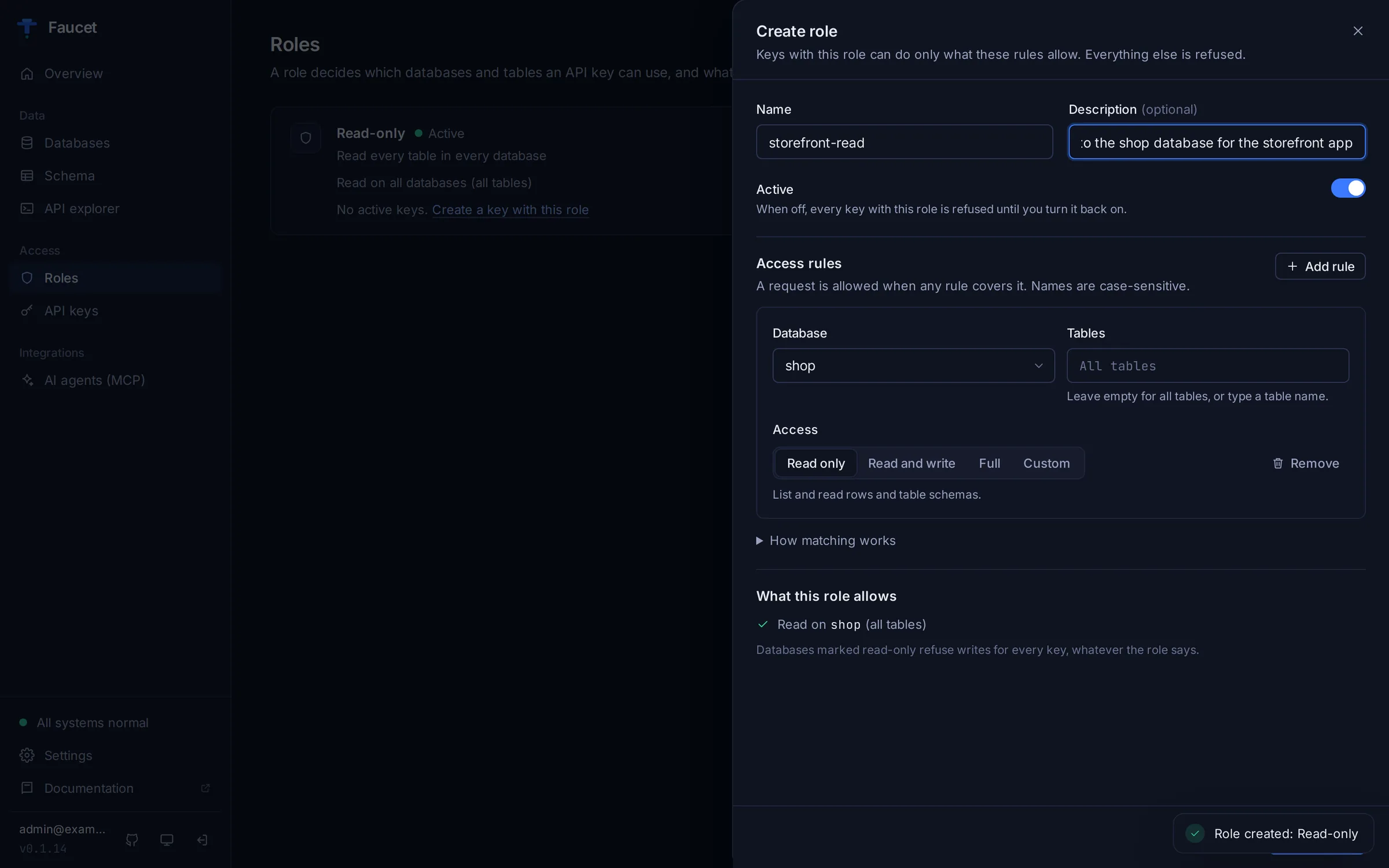
Open Roles in the admin UI. With no roles yet, you can create Read-only on everything or Full access to everything with one click, or choose Create custom role. In the role editor, each access rule has three parts:
- Database: one database, All databases (
*), or a name pattern (prod_*). - Tables: leave empty for every table, or name one.
- Access: Read only (GET), Read and write (GET, POST, PUT, PATCH), Full (all verbs including DELETE), or Custom.
What this role allows sums up the rules in plain words while you edit.
Rules on all tables also cover schema changes
A rule whose tables are left empty matches _schema as well as _table. A Read and write or Full rule therefore also allows creating, altering and (with Full) dropping tables through /_schema. To limit a key to rows only, type _table/* as the table pattern.
Via CLI
faucet role create --name readonly --verbs GET --description "Read-only access to all services"
faucet role create --name editor --verbs GET,POST,PUT,PATCH --description "Read and write access"
faucet role create --name admin --verbs '*' --description "Full access"

# Add more rules later
faucet role grant --role editor --service mydb --component "_table/orders" --verbs DELETE
A role created without --verbs has no rules and denies every request until you grant one.
Via API
curl -X POST http://localhost:8080/api/v1/system/role \
  -H "Authorization: Bearer $TOKEN" \
  -H "Content-Type: application/json" \
  -d '{
    "name": "readonly",
    "description": "Read-only access to all tables",
    "access": [
      {
        "service_name": "*",
        "component": "_table/*",
        "verb_mask": 1
      }
    ]
  }'
Access Rules
Each role contains an access array of rules. Each rule specifies:
| Field | Type | Description |
|---|---|---|
service_name | string | Database service name (or * for all services) |
component | string | API component path (e.g., _table/*, _table/users, _schema/*, _proc/*) |
verb_mask | integer | Bitmask of allowed HTTP verbs |
requestor_mask | integer | Source of request (1=API, 2=Script, 4=Admin) |
filters | array | Row-level filters (optional; stored and returned, not yet enforced) |
filter_op | string | How to combine filters: AND or OR |
Component Patterns
The component field specifies which API endpoint the rule applies to:
| Pattern | Matches |
|---|---|
_table/* | All tables |
_table/users | Only the users table |
_table/orders | Only the orders table |
_schema/* | All schema operations |
_proc/* | All stored procedures |
_proc/calculate_total | Only the calculate_total procedure |
Role Examples
Read-only access to all tables across all services:
{
  "name": "readonly",
  "description": "Read-only access",
  "access": [
    {
      "service_name": "*",
      "component": "_table/*",
      "verb_mask": 1
    }
  ]
}
Full CRUD on specific tables in one service:
{
  "name": "orders_manager",
  "description": "Manage orders and order_items tables",
  "access": [
    {
      "service_name": "mydb",
      "component": "_table/orders",
      "verb_mask": 31
    },
    {
      "service_name": "mydb",
      "component": "_table/order_items",
      "verb_mask": 31
    },
    {
      "service_name": "mydb",
      "component": "_table/products",
      "verb_mask": 1
    }
  ]
}
Read-only access with schema viewing:
{
  "name": "analyst",
  "description": "Read data and view schemas",
  "access": [
    {
      "service_name": "*",
      "component": "_table/*",
      "verb_mask": 1
    },
    {
      "service_name": "*",
      "component": "_schema/*",
      "verb_mask": 1
    }
  ]
}
Row-level filters (stored, not yet enforced)
Not enforced yet
Filters are saved on an access rule and returned by the API, but Faucet does not yet apply them to queries. Do not rely on them to isolate tenants; use separate roles/services or database views instead.
Access rules can include filters intended to restrict which rows a role can access. Applying them to queries as additional WHERE conditions is planned. Today, a role with a filter still sees and changes every row its verb permissions allow.
To limit a key to a subset of rows today, create a database view (or a dedicated database user and schema) that contains only those rows, connect it as its own service or table, and grant the role access to that view only.
Filter Structure
Each filter has three fields:
| Field | Type | Description |
|---|---|---|
name | string | Column name |
operator | string | Comparison operator (=, !=, >, <, >=, <=, LIKE, IN, IS NULL, IS NOT NULL) |
value | string | Value to compare against |
Filter Examples
These examples show the stored format. None of them restricts rows until filter enforcement ships.
Intended: restrict to one tenant's records (not enforced yet):
{
  "name": "tenant_user",
  "description": "Can only see records for their tenant",
  "access": [
    {
      "service_name": "mydb",
      "component": "_table/*",
      "verb_mask": 31,
      "filters": [
        {
          "name": "tenant_id",
          "operator": "=",
          "value": "42"
        }
      ]
    }
  ]
}
Intended: restrict to active records only (not enforced yet):
{
  "name": "active_only",
  "description": "Can only see non-deleted records",
  "access": [
    {
      "service_name": "mydb",
      "component": "_table/*",
      "verb_mask": 1,
      "filters": [
        {
          "name": "deleted_at",
          "operator": "IS NULL",
          "value": ""
        },
        {
          "name": "is_active",
          "operator": "=",
          "value": "true"
        }
      ],
      "filter_op": "AND"
    }
  ]
}
Intended: restrict by region (not enforced yet):
{
  "name": "us_east_reader",
  "description": "Read access to US-East region data",
  "access": [
    {
      "service_name": "mydb",
      "component": "_table/orders",
      "verb_mask": 1,
      "filters": [
        {
          "name": "region",
          "operator": "IN",
          "value": "'us-east-1','us-east-2'"
        }
      ]
    }
  ]
}
Combining Filters
The filter_op field records how multiple filters are meant to be combined:
AND(default): All filters must matchOR: Any filter can match
API Keys
API keys are the primary authentication mechanism for non-admin API consumers. Each key is bound to exactly one role.
Key Format
API keys follow the format: faucet_ followed by 64 hex characters (32 random bytes).
faucet_a1b2c3d4e5f67890abcdef1234567890abcdef1234567890abcdef12345678Security
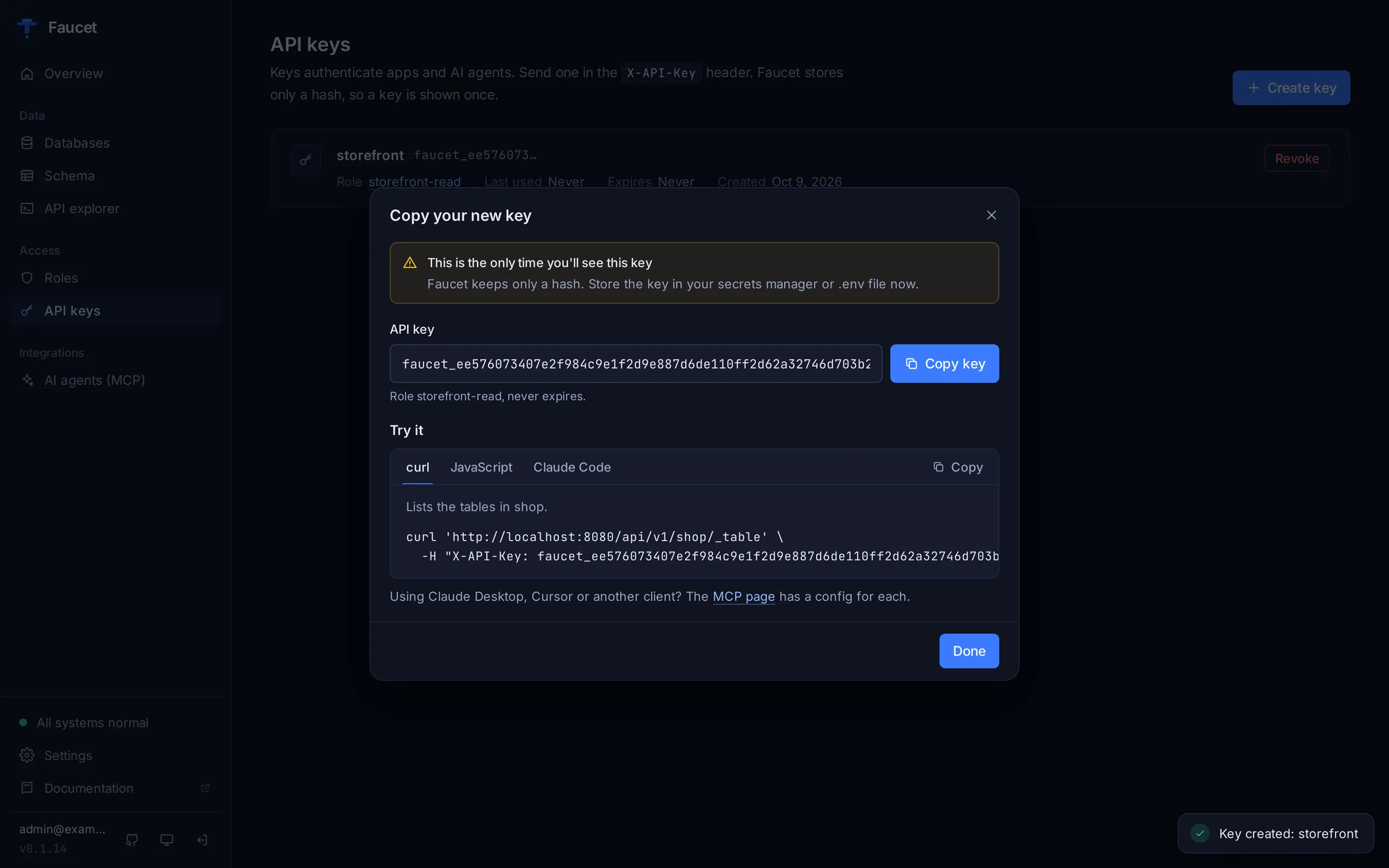
- The plaintext key is shown exactly once when created
- Only a SHA-256 hash is stored in the database
- The key prefix (first 15 characters) is stored for identification
- Keys can have an optional expiration date
- Revoked keys are immediately deactivated
Creating API Keys
In the admin UI, open API keys and click Create key. Faucet shows the key once, together with curl, JavaScript and Claude Code snippets that already contain it. See Admin UI → API keys.
Via CLI:
faucet key create --role readonly --label "CI pipeline"Via API:
curl -X POST http://localhost:8080/api/v1/system/api-key \
  -H "Authorization: Bearer $TOKEN" \
  -H "Content-Type: application/json" \
  -d '{
    "role_id": 2,
    "label": "CI pipeline",
    "expires_at": "2026-01-01T00:00:00Z"
  }'
Response (save the api_key value immediately):
{
  "id": 1,
  "api_key": "faucet_a1b2c3d4e5f67890abcdef1234567890abcdef1234567890abcdef12345678",
  "key_prefix": "faucet_a1b2c3d",
  "label": "CI pipeline",
  "role_id": 2,
  "is_active": true,
  "created_at": "2025-01-15T10:30:00Z"
}
Listing API Keys
faucet key list
# or
faucet key list --json
Revoking API Keys
Via CLI:
faucet key revoke faucet_a1b2c3dVia API:
curl -X DELETE http://localhost:8080/api/v1/system/api-key/1 \
  -H "Authorization: Bearer $TOKEN"
Using API Keys
Include the key in the X-API-Key header:
curl http://localhost:8080/api/v1/mydb/_table/users \
  -H "X-API-Key: faucet_a1b2c3d4e5f67890abcdef..."
Requestor Mask
The requestor_mask field on access rules controls which type of caller can use the rule:
| Value | Constant | Description |
|---|---|---|
| 1 | RequestorAPI | External API calls (via API key) |
| 2 | RequestorScript | Server-side scripts |
| 4 | RequestorAdmin | Admin panel requests |
Combine values to allow multiple requestor types. For example, requestor_mask: 5 allows both API and Admin requests (1 + 4).
Complete RBAC Setup Example
Here is a full example setting up RBAC for an application with an analytics dashboard, a backend, and a per-tenant client. Because row-level filters are not enforced yet, the tenant role below is limited only by its verbs and tables; point it at a tenant-specific view or service for real isolation.
# 1. Create roles
# Read-only role for analytics dashboards
curl -X POST http://localhost:8080/api/v1/system/role \
  -H "Authorization: Bearer $TOKEN" \
  -H "Content-Type: application/json" \
  -d '{
    "name": "analytics",
    "description": "Read-only access for analytics dashboards",
    "access": [
      {"service_name": "production", "component": "_table/*", "verb_mask": 1}
    ]
  }'

# Full CRUD role for the application backend
curl -X POST http://localhost:8080/api/v1/system/role \
  -H "Authorization: Bearer $TOKEN" \
  -H "Content-Type: application/json" \
  -d '{
    "name": "app_backend",
    "description": "Full CRUD for application",
    "access": [
      {"service_name": "production", "component": "_table/*", "verb_mask": 31},
      {"service_name": "production", "component": "_proc/*", "verb_mask": 3}
    ]
  }'

# Tenant role (the filter is stored but not enforced yet)
curl -X POST http://localhost:8080/api/v1/system/role \
  -H "Authorization: Bearer $TOKEN" \
  -H "Content-Type: application/json" \
  -d '{
    "name": "tenant_42",
    "description": "Scoped to tenant 42",
    "access": [
      {
        "service_name": "production",
        "component": "_table/*",
        "verb_mask": 11,
        "filters": [{"name": "tenant_id", "operator": "=", "value": "42"}]
      }
    ]
  }'

# 2. Create API keys for each role
curl -X POST http://localhost:8080/api/v1/system/api-key \
  -H "Authorization: Bearer $TOKEN" \
  -H "Content-Type: application/json" \
  -d '{"role_id": 1, "label": "Analytics dashboard"}'

curl -X POST http://localhost:8080/api/v1/system/api-key \
  -H "Authorization: Bearer $TOKEN" \
  -H "Content-Type: application/json" \
  -d '{"role_id": 2, "label": "App backend server"}'

curl -X POST http://localhost:8080/api/v1/system/api-key \
  -H "Authorization: Bearer $TOKEN" \
  -H "Content-Type: application/json" \
  -d '{"role_id": 3, "label": "Tenant 42 mobile app"}'